

- Plan & Book
- Travel Information
- Experience
-
-
-
 EN ▼
Choose your country/region and language
EN ▼
Choose your country/region and language
-
-
EN ▼
What can I use SriLankan Wi-Fi for?
You can use SriLankan’s in-flight wi-fi network to surf the internet, use email, instant messaging and social networking like you would on ground.
What devices can I use with SriLankan’s Wi-Fi?
You can use any Wi-Fi enabled device, including laptops, tablets and smartphones on SriLankan’s in-flight Wi-Fi network.
At what stages of flight can I use Wi-Fi?
The in-flight Wi-Fi network will be activated once the aircraft reaches a minimum altitude 1500ft. It will be deactivated during landing.
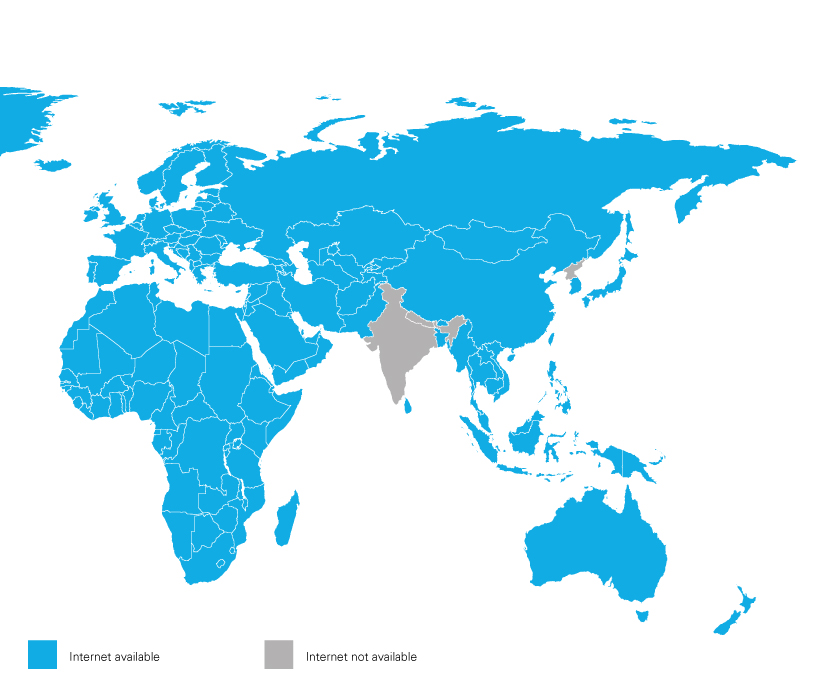
What are the areas with coverage?
SriLankan’s in-flight Wi-Fi is available over most regions of the world. However, the service may not be available over countries that have regulatory restrictions and can be disrupted due to extreme weather conditions. You will get system updates during the flight on the status of the service, although such events may occur without warning.
How can I optimize my data allowance?
In-flight internet is expensive, as it is communicated over a satellite link. Hence, it is recommended to turn-off automatic synchronizations, any automatic software updates or other internet related applications running in the background prior to connecting to the network to make the most of your data allowance.
Who should I contact on billing queries or for additional information?
You may contact our service provider, Onair, for additional information and billing queries.Email cs@onair.aero Phone +1 514 282 5239
Why is my internet speed not as fast as expected?
Connecting passengers to the Internet whilst flying at 30,000 feet at speeds of over 600 miles per hour is complicated! It involves many aspects from the technology on board, satellite connections and ground network management. As a result of this, as with all Wi-Fi connections, actual connection speed will vary depending on the technology installed (Standard or High-Speed Wi-Fi) on the aircraft, as well as the number of passengers connected. Alternatively, the flight may have a speed restricted price plan in order to limit the type of internet browsing/streaming activities allowed!
How does the user experience work on board connected flights?
Depending on the technology installed onboard, Standard or High-Speed Internet, as well as the number of connected users, passengers may experience a difference in their usage of the onboard Wi-Fi. Our connected aircraft are installed with Standard speed internet, which would give you the capability to access social media, websites your emails but would restrict streaming capabilities onboard.
How do I connect?
Good news… if you are reading this, you are connected but you can only browse the free content pages available on the portal. To connect to the Internet, you will need to select one of the price-plan offers available.
Why do you need my email address?
You will be prompted to enter your email address, this will allow us to send you the purchase confirmation email as proof of your connection.
Can I access the service through multiple devices?
You can connect multiple devices simply by purchasing another price-plan. Currently it is not possible to connect multiple devices on the same price-plan.
How can I pay?
Once you select a price plan you will be redirected to the purchase page. Simply select the payment method, enter the details and confirm!
What payment methods are available?
We accept most major Maestro and Credit Card payments on all flights.
Why can’t I pay?
Either you are using a non-supported payment method (please check the details of acceptable payment options on the payment page) or the details you have entered are not valid.
NOTE: New banking regulations in certain global regions have introduced a higher security authorization (SCA – Strong Customer Authentication) for online payments meaning you need to authorize the payment, normally via an App on your phone. If this is the case, then your payment may fail since you are “offline”, and your bank cannot contact you!
What is a Promo Code?
Promo Codes are special offers from your airline. It may be for a specific price-plan or for certain passengers. If you have one, enter it in the promo code box and try the service.
Why are the prices all in US Dollars?
We like to keep things simple, one currency across all flights regardless of departure and arrival cities saves having to recalculate all the prices for every flight.
Why do I pay more than the indicated price?
In some case, if you are using a Credit Card or other payment method not in US Dollar Currency, then there may be fluctuations in the exchange rate or additional charges made by your Credit Card provider. Alternatively, it could be that on specific flights an Indirect Tax (GST/VAT/TVA etc.) is charged. If this is the case the details will be displayed on the payment confirmation page and within your payment confirmation email.
Can I pause the service I am using during the flight?
Yes, depending on the access plan you have chosen. If you have a compatible plan, you will find the ‘Pause’ functionality at the top of the browse page. To restart your session, click the same button.
What happens if the service is unavailable?
Your session will automatically stop when you sign out or if service becomes unavailable on the flight. Anytime the session is disconnected your time and volume consumption will not be counted.
Can I stream video?
Video streaming sites such as YouTube may be restricted due to the limitations from the Standard speed internet on our connected aircraft.
What is the connection speed?
As with all Wi-Fi connections, actual connection speed will vary depending on the technology installed (Standard Wi-Fi or High Speed) on the aircraft, as well as the number of passengers connected.
What happens if I reach my Internet session limit?
Upon reaching your Internet session limit you will be given the option to purchase a new plan of your choice. You will be required to re-enter your payment details to complete your purchase.
Can I re-use any remaining balance from my price plan?
Purchased sessions are valid until the balance is used and/or expired, whichever event occurs earlier.
How do I know how much I have used?
How much data/time has been consumed, is available on the portal during your flight and displayed at the top of the portal connected/browse page. The following figures can be used as a guideline:
| Activity | Average data consumed |
|---|---|
| Send or receive one email, text only | 0.02 MB |
| Texting via a messaging app – 3 to 4 messages | 0.1 MB |
| 1 photo message | 2 MB |
| 5 mins listening to an audio stream | 5 MB |
| 5 mins Social Media use | 7.5 MB |
| 4 mins viewing video content on Social Media page | 10 MB |
| 1 min HD Video Streaming | 17 MB |
What OS/web browsers are supported?
The inflight Wi-Fi hotspot is not OS-specific and as such will work with all major operating systems (OS) if there is a compatible browser installed. The latest versions of the following web browsers are supported:
Can I access my corporate network?
Yes. Virtual private network (VPN) clients are supported. However, your usage may not be displayed correctly.
Why can’t I access certain content and/or websites?
To ensure appropriate use of the service, certain content may be blocked, such as:
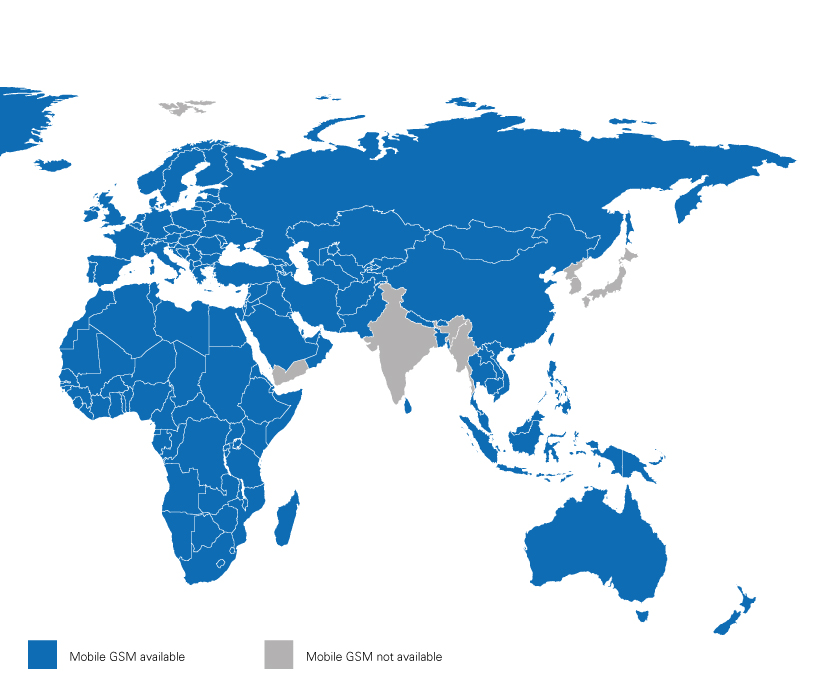
Why can’t I send or receive SMS or make or receive phone calls?
Cellular service is not enabled on the Internet Wi-Fi Hotspot.
My connection speed seems very slow
Bandwidth resources onboard, like most ground-based connections, are unfortunately limited and therefore are closely monitored. Either there is congestion on the portal with many passengers trying to connect at the same time, or the aircraft might be in a zone with limited coverage.
I seem to have lost connection
If your device has battery and the Wi-Fi is switched on there might be an issue with the onboard system. Our Wi-Fi onboard only works above 10,000 feet so is automatically disabled during take-off and landing phases. Alternatively, there may be a temporary stoppage if the aircraft is within a restricted use zone (check the coverage map) or there may be an issue with the satellite connection.
Didn’t find the answer you were looking for? Ask your question below.


